Chapter 3: “Lists” (pp.62-73):
Ordered Lists
<ol>
The ordered list is created with
the <ol> element.
<li>
Each item in the list is placed
between an opening <li> tag
and a closing </li> tag. (The li
stands for list item.)
Unordered Lists
<ul>
The unordered list is created
with the <ul> element.
<li>
Each item in the list is placed
between an opening <li> tag
and a closing </li> tag. (The li
stands for list item.)
Definition Lists
<dl>
The definition list is created with
the <dl> element and usually
consists of a series of terms and
their definitions.
Inside the <dl> element you will
usually see pairs of <dt> and
<dd> elements.
<dt>
This is used to contain the term
being defined (the definition
term).
<dd>
This is used to contain the
definition.
Nested Lists
You can put a second list inside
an <li> element to create a sublist
or nested list.
Chapter 13: “Boxes” (pp.300-329):
Box dimensions: width, height , they control the size of your box. whether it was a pargraph or a div or anything else.
Limiting Width min-width, max-width , min-height , max-height for flexibilty in sizing the box in smaller or wider screens.
overflow property
hidden This property simply hides any extra content that does not fit in the box. scroll This property adds a scrollbar to the box so that users can scroll to see the missing content.
border , margin , padding border is the lining of the box ,the border separates the edge of one box from another.
Margins sit outside the edge of the border.
Padding is the space between the border of a box and any content contained within it.
border-width for adjusting the border size border-style you can set the border to be dotted or solid etc.. border-color set the color of the border
The border property allows you to specify the width, style and color of a border in one property (and the values should be coded in that specific order).
border : width style color ;
text-align :center;
display inline This causes a block-level element to act like an inline element. block This causes an inline element to act like a block-level element. inline-block This causes a block-level element to flow like an inline element, while retaining other features of a block-level element. none This hides an element from the page
The visibility property allows you to hide boxes from users but It leaves a space where the element would have been. This property can take two values: hidden This hides the element. visible This shows the element.
If the visibility of an element is set to hidden, a blank space will appear in its place.
CSS3
-
border images: The border-image property applies an image to the border of any box. It takes a background image and slices it into nine pieces.
-
box-shadow
The box-shadow property allows you to add a drop shadow around a box
- border-radius :CSS3 introduces the ability to create rounded corners on any box, using a property called border-radius.
Chapter 4: “Decisions and Loops” from switch statements on (pp.162-182):
If-else statement :
The if..else statement checks a condition , if it resloves to true the first code block is excuted. if the condition resloves to false the second code block is run instead.
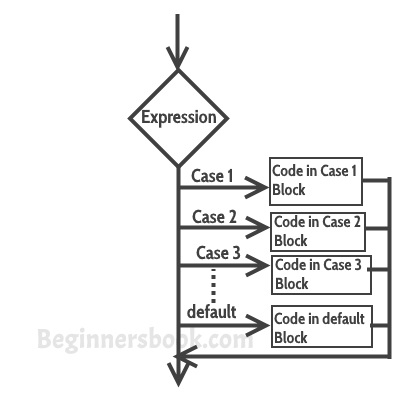
Switch statement :
A switch statement starts with a variable called the switch value. Each case indicates a possible value for this variable and the code that should run if the variable matches that value.
the end